第四阶段:Java 核心 API
十七、String 类
17.1 概述
String 类代表字符串,Java 程序中所有的双引号字符串都是 String 类的对象。String 位于 java.lang 包,使用时不需要导包。
17.2 构造方法
| 构造方法 | 说明 |
|---|---|
public String() | 创建空白字符串 |
public String(char[] chs) | 根据字符数组创建 |
public String(byte[] bys) | 根据字节数组创建 |
String s = "abc" | 直接赋值(推荐) |
17.3 字符串的特点
特点 1:通过 new 创建的字符串在堆中开辟新空间,内容相同也不是同一个对象。
String s1 = new String("abc");
String s2 = new String("abc");
System.out.println(s1 == s2);  // false(地址不同)
特点 2:字符串不可变(创建后内容不可更改)。
特点 3:通过 "" 直接赋值的字符串存储在字符串常量池中,相同的值只存一份。
String s3 = "abc";
String s4 = "abc";
System.out.println(s3 == s4);  // true(指向常量池同一对象)
17.4 字符串的比较
// 比较基本数据类型:用 == 比较值
int a = 10, b = 10;
System.out.println(a == b);  // true

// 比较引用数据类型:用 equals() 比较内容
String s1 = new String("abc");
String s2 = new String("abc");
System.out.println(s1.equals(s2));  // true(比较内容)
System.out.println(s1 == s2);       // false(比较地址)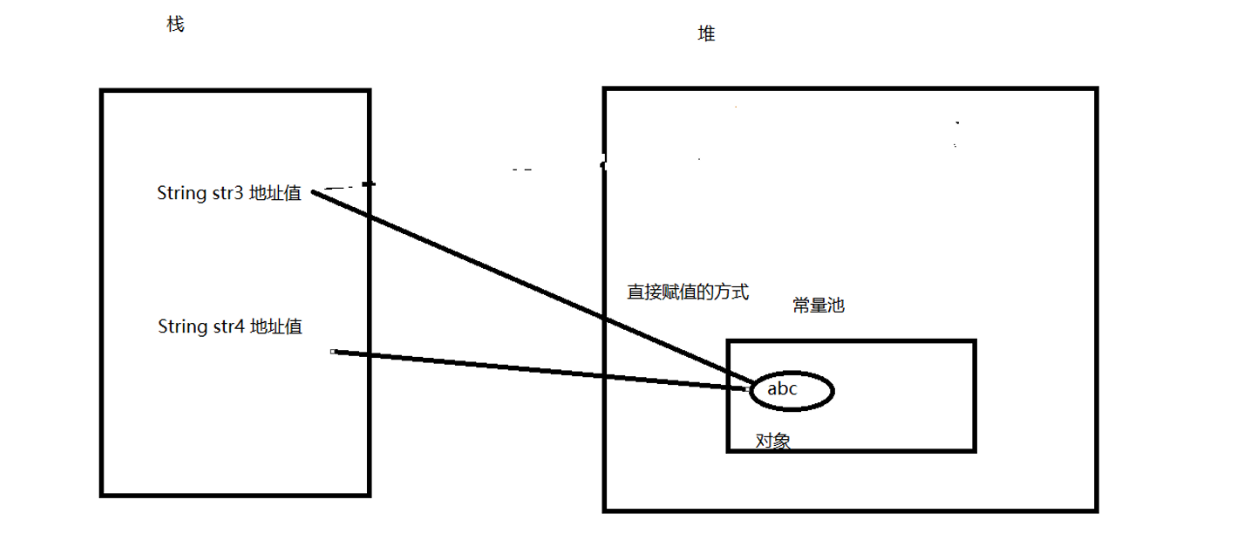
17.5 常用方法
String str = "Hello, Java";

// 获取长度
int len = str.length();                      // 11

// 拼接
String s = str.concat(" World");             // "Hello, Java World"
String s2 = str + " World";                  // 同上,推荐用 + 拼接

// 获取指定字符
char ch = str.charAt(1);                     // 'e'

// 查找索引
int idx1 = str.indexOf("Java");              // 7
int idx2 = str.indexOf("a", 8);              // 从索引8开始查找
int idx3 = str.lastIndexOf("a");             // 10
int idx4 = str.lastIndexOf("a", 9);          // 从索引9向前查找

// 截取
String sub1 = str.substring(7);              // "Java"
String sub2 = str.substring(7, 9);           // "Ja"(含头不含尾)

// 其他常用
str = str.trim();                            // 去除首尾空格
str = str.toLowerCase();                     // 转小写
str = str.toUpperCase();                     // 转大写
boolean flag = str.startsWith("Hello");      // true
boolean flag2 = str.endsWith("Java");        // true
String[] parts = str.split(", ");            // ["Hello", "Java"]
String replaced = str.replace("Java", "World"); // "Hello, World"
十八、集合
18.1 集合与数组的区别
| 对比项 | 数组 | 集合 |
|---|---|---|
| 长度 | 固定不变 | 可变(动态扩容) |
| 元素类型 | 基本/引用类型均可 | 只能存放引用类型 |
| 方法支持 | 较少 | 丰富(增删改查) |
18.2 List
List:有序集合,可包含重复元素。
ArrayList
底层基于动态数组,适合随机访问(查改多)。
import java.util.ArrayList;

ArrayList<String> list = new ArrayList<>();

list.add("元素1");         // 添加
list.add("元素2");
String e = list.get(0);    // 获取(索引0)
list.set(0, "新元素");     // 修改
list.remove(0);            // 删除
int size = list.size();    // 大小
boolean exist = list.contains("元素1");  // 是否包含
LinkedList
底层基于双向链表,适合频繁的插入和删除操作。
import java.util.LinkedList;

LinkedList<String> list = new LinkedList<>();

list.add("元素1");
list.addFirst("头部元素");  // 头部插入
list.addLast("尾部元素");   // 尾部插入

String first = list.getFirst();
String last = list.getLast();

list.removeFirst();
list.removeLast();
18.3 Set
Set:不允许包含重复元素的集合。
HashSet
基于 HashMap 实现,无序(不保证顺序)。
import java.util.HashSet;

HashSet<String> set = new HashSet<>();

set.add("元素1");
set.add("元素2");
boolean exists = set.contains("元素1");  // true
set.remove("元素1");
TreeSet
基于 TreeMap 实现,元素按自然顺序或比较器排序。
import java.util.TreeSet;

TreeSet<String> set = new TreeSet<>();
set.add("C");
set.add("A");
set.add("B");  // 存储后自动排序为 A, B, C

String first = set.first();  // "A"
String last = set.last();    // "C"
18.4 Map
Map:键值对集合,键不能重复,每个键映射到一个值。
HashMap
基于哈希表实现,无序,是使用最广泛的 Map。
import java.util.HashMap;
import java.util.Map;

HashMap<String, Integer> map = new HashMap<>();

map.put("key1", 1);          // 添加键值对
map.put("key2", 2);

Integer value = map.get("key1");           // 根据键取值
boolean hasKey = map.containsKey("key1");  // 判断键是否存在
map.remove("key1");                        // 删除

// 遍历
for (Map.Entry<String, Integer> entry : map.entrySet()) {
    System.out.println(entry.getKey() + ": " + entry.getValue());
}
TreeMap
基于红黑树实现,键按自然顺序或比较器排序。
import java.util.TreeMap;

TreeMap<String, Integer> map = new TreeMap<>();
map.put("B", 2);
map.put("A", 1);  // 键自动排序

String firstKey = map.firstKey();  // "A"
String lastKey = map.lastKey();    // "B"
18.5 Collections 工具类
import java.util.Collections;

// 排序
Collections.sort(list);

// 反转
Collections.reverse(list);

// 随机打乱
Collections.shuffle(list);

// 查找最大/最小值
String max = Collections.max(list);
String min = Collections.min(list);

// 线程安全包装
List<String> safeList = Collections.synchronizedList(list);
18.6 集合的遍历方式
List<String> list = Arrays.asList("A", "B", "C");

// 1. for-each
for (String item : list) {
    System.out.println(item);
}

// 2. 迭代器
Iterator<String> iterator = list.iterator();
while (iterator.hasNext()) {
    String item = iterator.next();
    System.out.println(item);
}

// 3. Stream API(Java 8+)
list.stream().forEach(System.out::println);
十九、异常处理
19.1 异常体系
Throwable
├── Error(错误,不可处理)
│   ├── OutOfMemoryError
│   ├── StackOverflowError
│   └── ...
└── Exception(异常,可处理)
    ├── 检查型异常(Checked Exception)
    │   ├── IOException
    │   ├── SQLException
    │   └── ...
    └── 运行时异常(RuntimeException)
        ├── NullPointerException
        ├── ArrayIndexOutOfBoundsException
        ├── IllegalArgumentException
        └── ...
19.2 try-catch-finally
import java.io.BufferedReader;
import java.io.FileReader;
import java.io.IOException;

public class TryCatchDemo {
    public static void main(String[] args) {
        BufferedReader br = null;
        try {
            br = new BufferedReader(new FileReader("a.txt"));
            String line = br.readLine();
            System.out.println(line);
        } catch (IOException e) {
            System.out.println("读取失败:" + e.getMessage());
        } finally {
            // 无论是否异常,finally 块一定会执行
            try {
                if (br != null) br.close();
            } catch (IOException e) {
                System.out.println("关闭资源失败:" + e.getMessage());
            }
        }
    }
}
19.3 try-with-resources(JDK 7+)
自动关闭实现了 AutoCloseable 接口的资源:
import java.io.BufferedReader;
import java.io.FileReader;
import java.io.IOException;

public class TryWithResourcesDemo {
    public static void main(String[] args) {
        try (BufferedReader br = new BufferedReader(new FileReader("a.txt"))) {
            System.out.println(br.readLine());
        } catch (IOException e) {
            System.out.println(e.getMessage());
        }
        // br 自动关闭,无需 finally
    }
}
19.4 throws 与自定义异常
// 自定义异常
class BizException extends Exception {
    public BizException(String message) {
        super(message);
    }
}

public class ThrowsDemo {
    // throws:声明方法可能抛出的异常
    static void check(int n) throws BizException {
        if (n < 0) {
            throw new BizException("参数不能为负数");  // 抛出异常
        }
    }

    public static void main(String[] args) {
        try {
            check(-1);
        } catch (BizException e) {
            System.out.println(e.getMessage());
        }
    }
}
二十、包与访问控制
20.1 package 与 import
package com.example.demo;  // 必须写在文件第一行

import java.util.List;      // 导入指定类型
import java.util.*;         // 导入包下所有类型(不推荐,影响编译速度)

public class Hello {
    public static void main(String[] args) {
        // 如果两个包名冲突,使用完整限定名
        java.util.Date d1 = new java.util.Date();
    }
}
20.2 访问修饰符总结
| 修饰符 | 本类 | 同包 | 子类(不同包) | 任意 |
|---|---|---|---|---|
private | ✅ | ❌ | ❌ | ❌ |
| 默认(不写) | ✅ | ✅ | ❌ | ❌ |
protected | ✅ | ✅ | ✅ | ❌ |
public | ✅ | ✅ | ✅ | ✅ |
二十一、static 与 final
21.1 static
| 修饰位置 | 效果 |
|---|---|
| 变量 | 类变量,所有实例共享一份 |
| 方法 | 类方法,可通过类名直接调用 |
| 代码块 | 类加载时执行一次,常用于初始化静态资源 |
public class StaticDemo {
    static int count = 0;          // 类变量
    String name;                   // 实例变量

    static {
        System.out.println("静态块:类加载时执行一次");
        count = 100;
    }

    static void showCount() {      // 静态方法
        System.out.println("Count: " + count);
        // System.out.println(name);  // ❌ 静态方法不能直接访问非静态成员
    }
}

// 使用
StaticDemo.showCount();   // 通过类名调用
System.out.println(StaticDemo.count);
21.2 final
| 修饰位置 | 效果 |
|---|---|
| 变量 | 常量,只能赋值一次 |
| 方法 | 不可被子类重写 |
| 类 | 不可被继承 |
public class Consts {
    public static final double PI = 3.141592653589793;
}

final class MathUtils {    // 不可被继承
    public final void sqrt() {  // 不可被重写
        // ...
    }
}
二十二、包装类与装箱拆箱
22.1 基本类型与包装类
| 基本类型 | 包装类 |
|---|---|
byte | Byte |
short | Short |
int | Integer |
long | Long |
float | Float |
double | Double |
boolean | Boolean |
char | Character |
22.2 自动装箱与拆箱
public class BoxDemo {
    public static void main(String[] args) {
        // 自动装箱:int → Integer
        Integer a = 1;

        // 自动拆箱:Integer → int
        int b = a;

        // 字符串转数字
        int c = Integer.parseInt("123");

        System.out.println(a + b + c);  // 输出:247
    }
}
22.3 包装类的缓存机制(补充)
Integer x = 127;  // 等价于 Integer.valueOf(127)
Integer y = 127;
System.out.println(x == y);  // true(-128~127 缓存范围内)

Integer m = 128;
Integer n = 128;
System.out.println(m == n);  // false(超出缓存范围,创建新对象)

// 推荐使用 equals 比较包装类
System.out.println(m.equals(n));  // true
二十三、泛型基础
23.1 泛型类与方法
// 泛型类
class Box<T> {
    private T value;

    public Box(T value) {
        this.value = value;
    }

    public T get() {
        return value;
    }

    public void set(T value) {
        this.value = value;
    }
}

// 使用
Box<String> stringBox = new Box<>("Hello");
String s = stringBox.get();

Box<Integer> intBox = new Box<>(123);
int n = intBox.get();
23.2 泛型方法
public class GenericMethodDemo {
    // 泛型方法:<T> 声明在返回值之前
    public static <T> T getMiddle(T... args) {
        return args[args.length / 2];
    }

    public static void main(String[] args) {
        String mid = getMiddle("A", "B", "C");  // "B"
        System.out.println(mid);
    }
}
23.3 通配符与上下界
List<?> list;              // 任意类型(只读安全)
List<? extends Number>;    // 上界通配符:Number 及其子类
List<? super Integer>; // 下界通配符:Integer 及其父类// ? extends:可以读,不能写(不知道具体类型)
public static double sum(List<? extends Number> list) {
double total = 0;
for (Number n : list) {
total += n.doubleValue();
}
return total;
}
// ? super:可以写,读只能读到 Object
public static void addNumbers(List<? super Integer> list) {
list.add(1);
list.add(2);
}二十四、时间日期 API
24.1 旧 API 的问题(补充)
java.util.Date:可变、线程不安全、设计混乱java.util.Calendar:可变、月份从 0 开始
24.2 新 API(java.time)
JDK 8 引入的 java.time 包,核心类都是不可变且线程安全的。
| 类 | 说明 |
|---|---|
LocalDate | 日期(年月日) |
LocalTime | 时间(时分秒) |
LocalDateTime | 日期 + 时间 |
DateTimeFormatter | 格式化 / 解析 |
Duration | 时间差(秒/纳秒) |
Period | 日期差(年月日) |
import java.time.LocalDate;
import java.time.LocalDateTime;
import java.time.LocalTime;
import java.time.format.DateTimeFormatter;

public class TimeDemo {
    public static void main(String[] args) {
        // 当前时间
        LocalDateTime now = LocalDateTime.now();
        System.out.println("当前时间:" + now);

        // 格式化
        String s = now.format(DateTimeFormatter.ofPattern("yyyy-MM-dd HH:mm:ss"));
        System.out.println("格式化:" + s);

        // 指定时间
        LocalDate date = LocalDate.of(2025, 1, 1);
        LocalTime time = LocalTime.of(10, 30, 0);
        System.out.println("日期:" + date + ",时间:" + time);

        // 日期运算
        LocalDate tomorrow = LocalDate.now().plusDays(1);    // 明天
        LocalDate lastMonth = LocalDate.now().minusMonths(1); // 上个月
        System.out.println("明天:" + tomorrow);

        // 解析字符串
        LocalDate parsed = LocalDate.parse("2025-06-15");
        System.out.println("解析:" + parsed);
    }
}
二十五、枚举与注解
25.1 枚举
枚举是一种特殊的类,用于定义一组常量。
public enum Day {
    MONDAY, TUESDAY, WEDNESDAY, THURSDAY, FRIDAY, SATURDAY, SUNDAY
}

// 使用
Day today = Day.MONDAY;
switch (today) {
    case MONDAY -> System.out.println("周一");
    case FRIDAY -> System.out.println("周五");
    default -> System.out.println("其他");
}枚举的高级用法(补充):
public enum Color {
    RED("#FF0000", "红色"),
    GREEN("#00FF00", "绿色"),
    BLUE("#0000FF", "蓝色");

    private final String hex;
    private final String name;

    Color(String hex, String name) {
        this.hex = hex;
        this.name = name;
    }

    public String getHex() { return hex; }
    public String getChineseName() { return name; }
}

// 使用
System.out.println(Color.RED.getHex());          // #FF0000
System.out.println(Color.GREEN.getChineseName()); // 绿色
25.2 注解
注解(Annotation)是一种元数据,可以为代码提供额外信息。
// 自定义注解
public @interface Note {
    String value();
    int priority() default 0;
}

// 使用注解
class Demo {
    @Note(value = "这是一个示例方法", priority = 1)
    void run() {
        System.out.println("running");
    }

    @Override  // 内置注解:检查重写
    public String toString() {
        return "Demo";
    }

    @Deprecated  // 标记为已废弃
    void oldMethod() {
        // 不推荐使用
    }

    @SuppressWarnings("unchecked")  // 抑制警告
    void process() {
        // ...
    }
}
二十六、Lambda 与函数式接口
26.1 函数式接口
函数式接口:仅包含一个抽象方法的接口,可用 @FunctionalInterface 标注。
@FunctionalInterface
public interface MyFunction {
    void execute();
    // void otherMethod();  // ❌ 只能有一个抽象方法
}
JDK 内置的常见函数式接口:
| 接口 | 方法 | 说明 |
|---|---|---|
Runnable | void run() | 无参无返回值 |
Supplier<T> | T get() | 无参有返回值(生产) |
Consumer<T> | void accept(T) | 有参无返回值(消费) |
Function<T,R> | R apply(T) | 有参有返回值(转换) |
Predicate<T> | boolean test(T) | 有参返回 boolean(判断) |
26.2 Lambda 语法
// 传统写法
Runnable r1 = new Runnable() {
    @Override
    public void run() {
        System.out.println("传统写法");
    }
};

// Lambda 写法
Runnable r2 = () -> System.out.println("Lambda 写法");语法格式:
(参数列表) -> { 方法体 }// 无参
Runnable r = () -> System.out.println("ok");
// 单参,可省略括号
Consumer<String> c = s -> System.out.println(s);
// 多参
Comparator<Integer> comp = (a, b) -> a - b;
// 多条语句,需要 {}
Function<String, Integer> f = (s) -> {
int len = s.length();
return len * 2;
};26.3 方法引用(补充)
// 静态方法引用
Consumer<String> c1 = System.out::println;  // 等价于 s -> System.out.println(s)

// 实例方法引用
List<String> list = Arrays.asList("B", "A", "C");
list.sort(String::compareToIgnoreCase);

// 构造方法引用
Supplier<List<String>> supplier = ArrayList::new;
二十七、Stream API(补充)
27.1 什么是 Stream
Stream 是 JDK 8 引入的函数式编程风格的 API,用于对集合数据进行声明式操作。
特点:
- 不存储数据,只对数据进行处理
- 不修改源数据,产生新结果
- 惰性求值,只在终止操作时执行
27.2 常用操作
import java.util.*;
import java.util.stream.Collectors;

public class StreamDemo {
    public static void main(String[] args) {
        List<String> list = Arrays.asList("Apple", "Banana", "Cherry", "Avocado", "Blueberry");

        // 过滤:筛选以 A 开头的
        List<String> filtered = list.stream()
                .filter(s -> s.startsWith("A"))
                .collect(Collectors.toList());
        System.out.println(filtered);  // [Apple, Avocado]

        // 映射:转大写
        List<String> uppercased = list.stream()
                .map(String::toUpperCase)
                .collect(Collectors.toList());

        // 排序
        List<String> sorted = list.stream()
                .sorted()
                .collect(Collectors.toList());

        // 跳过 + 限制
        List<String> skipped = list.stream()
                .skip(2)      // 跳过前 2 个
                .limit(2)     // 取 2 个
                .collect(Collectors.toList());

        // 归约:拼接
        String joined = list.stream()
                .collect(Collectors.joining(", "));
        System.out.println(joined);  // Apple, Banana, Cherry, Avocado, Blueberry

        // 统计
        long count = list.stream().filter(s -> s.length() > 5).count();
        System.out.println("长度大于5的有:" + count);
    }
}
二十八、Optional 类(补充)
Optional 用于优雅处理空指针问题,避免繁琐的 null 判空。
import java.util.Optional;

public class OptionalDemo {
    public static void main(String[] args) {
        // 创建 Optional
        Optional<String> empty = Optional.empty();
        Optional<String> present = Optional.of("Hello");     // 确定非空时使用
        Optional<String> nullable = Optional.ofNullable(null); // 可能为 null

        // 安全取值
        String result = nullable.orElse("默认值");
        String result2 = nullable.orElseGet(() -> "默认值");
        // String result3 = nullable.orElseThrow(() -> new RuntimeException("值为空"));

        // 判空处理
        present.ifPresent(s -> System.out.println("值:" + s));
        present.ifPresentOrElse(
                s -> System.out.println("值:" + s),
                () -> System.out.println("值为空")
        );

        // 链式操作
        String value = Optional.ofNullable(getConfig())
                .map(s -> s.toUpperCase())
                .filter(s -> s.length() > 3)
                .orElse("DEFAULT");
    }

    static String getConfig() {
        return "config";
    }
}
二十九、线程与并发入门
29.1 创建线程的三种方式
// 方式一:继承 Thread
class MyThread extends Thread {
    @Override
    public void run() {
        System.out.println("Thread 方式");
    }
}

// 方式二:实现 Runnable(推荐,因为 Java 单继承)
class MyTask implements Runnable {
    @Override
    public void run() {
        System.out.println("Runnable 方式");
    }
}

// 方式三:使用 Lambda(JDK 8+)
public class ThreadDemo {
    public static void main(String[] args) {
        // 继承 Thread
        new MyThread().start();

        // 实现 Runnable
        new Thread(new MyTask()).start();

        // Lambda
        new Thread(() -> System.out.println("Lambda 方式")).start();

        System.out.println("主线程");
    }
}
29.2 synchronized 同步
用于解决多线程访问共享数据的线程安全问题:
class Counter {
    private int count = 0;

    // 同步方法
    public synchronized void increment() {
        count++;
    }

    // 同步代码块
    public void decrement() {
        synchronized (this) {
            count--;
        }
    }

    public int getCount() {
        return count;
    }
}
三十、I/O 基础
30.1 流的概念
Java 中的 I/O(Input/Output)通过"流"的方式处理数据传输。
输入流(读):文件 → 程序
输出流(写):程序 → 文件
30.2 流分类
| 分类方式 | 分类 |
|---|---|
| 方向 | 输入流、输出流 |
| 单位 | 字节流(处理二进制)、字符流(处理文本) |
| 功能 | 节点流(直接操作数据源)、处理流(包装节点流) |
30.3 字节流
// InputStream / OutputStream 是抽象基类
// FileInputStream / FileOutputStream 是常用实现
30.4 字符流
// Reader / Writer 是抽象基类
// FileReader / FileWriter 是常用实现
30.5 NIO 简便读写(JDK 7+,推荐)
import java.nio.file.Files;
import java.nio.file.Path;

public class FileIODemo {
    public static void main(String[] args) throws Exception {
        Path p = Path.of("demo.txt");

        // 写文件
        Files.writeString(p, "Hello, Java I/O!");

        // 读文件
        String content = Files.readString(p);
        System.out.println(content);  // Hello, Java I/O!

        // 按行读
        Files.readAllLines(p).forEach(System.out::println);

        // 拷贝文件
        Files.copy(p, Path.of("demo_copy.txt"));

        // 删除文件
        // Files.delete(p);
    }
}第四阶段小结:本阶段覆盖了 Java 核心 API 的主要部分——字符串、集合框架、异常处理、泛型、时间日期、Lambda/Stream、Optional、多线程基础和 I/O。这些是日常开发中使用最频繁的工具和框架,请在学习中多结合实践来加深理解。